If you run your own business, there's a handful of filings that keep you legally in good standing – business licenses, seller's permits, annual corporate report, and more. If you needed to find or share one of those... how long would it take?
Let's start with your business license. The original filing might be a PDF in your downloads folder from years ago. Last year's renewal confirmation? That came via email. The portal where you actually file is a bookmark in a folder in another folder in one of your browsers. The due date? Maybe it's calendared – or you're good about checking the email reminders that office sends. And when that reminder comes, you dig through all of it, every year, to reconstruct what you need.
What if you could centralize all of it in one place, in one hour, using your own apps, stored to your own drives? Sounds good? Let's begin.
The List
Here are 10 critical U.S. business documents that keep your company running:
- EIN
- City business license
- County business license
- FBN (Fictitious Business Name)/DBA (Doing Business As) filing
- Franchise tax registration
- Seller's permit or sales tax license
- Registered agent agreement
- LLC or Corp annual report
- Home occupation permit
- Professional license
Important: This isn't legal or accounting advice; it's a productivity post. You may not be required to have all of these items, and you may not have heard of some of them until today. Search any item with your city and state name to learn more, and talk to professional advisors about these and other items you might want to add to your centralization list.
The Assets
For each of these, you want to capture:
- The filed document(s)
- The renewal date
- Related emails, files, and events from your app suite (renewal notices, confirmation receipts, etc.)
- The filing entity's online portal
- Contact information for the filing entity
- Notes (calls, supporting details)
The Platform
With Korgi, you can centralize all of this easily and permanently – in about an hour – with an AI-integrated productivity platform powered by your own apps and drives (Google Workspace, Microsoft 365, Gemini, Zoom, and more).
Below, we'll walk through how to create a "single source of truth card" for your city business license – watch the companion video here. Then you can repeat the process for your company’s remaining items.
City Business License: Full Walkthrough
Most cities require a business license to operate legally within city limits – even if you work from home. If you're not sure whether you have one or need one, search your city's name plus "business license" to find the issuing department (usually the City Clerk, Finance Department, or Office of Finance). If you don't yet have one and your city requires it, consult a professional or complete the registration process via your city's portal, then continue below.
To centralize and track your city business license with Korgi:
- Create or open a Korgi board for your business. Create a column for "Business Filings," or use Korgi’s “Business Organizer” template for a quick start.
- Create a new card. add a new card titled "City Business License."
- Attach your latest document. Open the card drawer, select the Google Drive or OneDrive icon, and connect your existing file (or upload from your computer). Pro tip: Print a hard copy of your current license for a physical business file, too. Some cities also require you to display it.
- Create a Calendar event for the next due date. Most city licenses renew annually (some are quarterly or monthly), often at the start of the calendar year or your registration anniversary. Open the card drawer and select the Google or Outlook Calendar icon to set the event. Be sure to also set a 30-day reminder, and set the event to recur annually. Pro Tip: To easily search for business deadlines in your calendar, start every event you create for this list with [BUSINESS NAME].
- Attach related assets. Use Korgi Console's Dash to do a universal search across Gmail, Calendar, Google Drive, and Contacts for the phrase "Business License" (in quotes). Connect any related emails, files, events, or contacts to your card – including renewal confirmations or payment receipts.
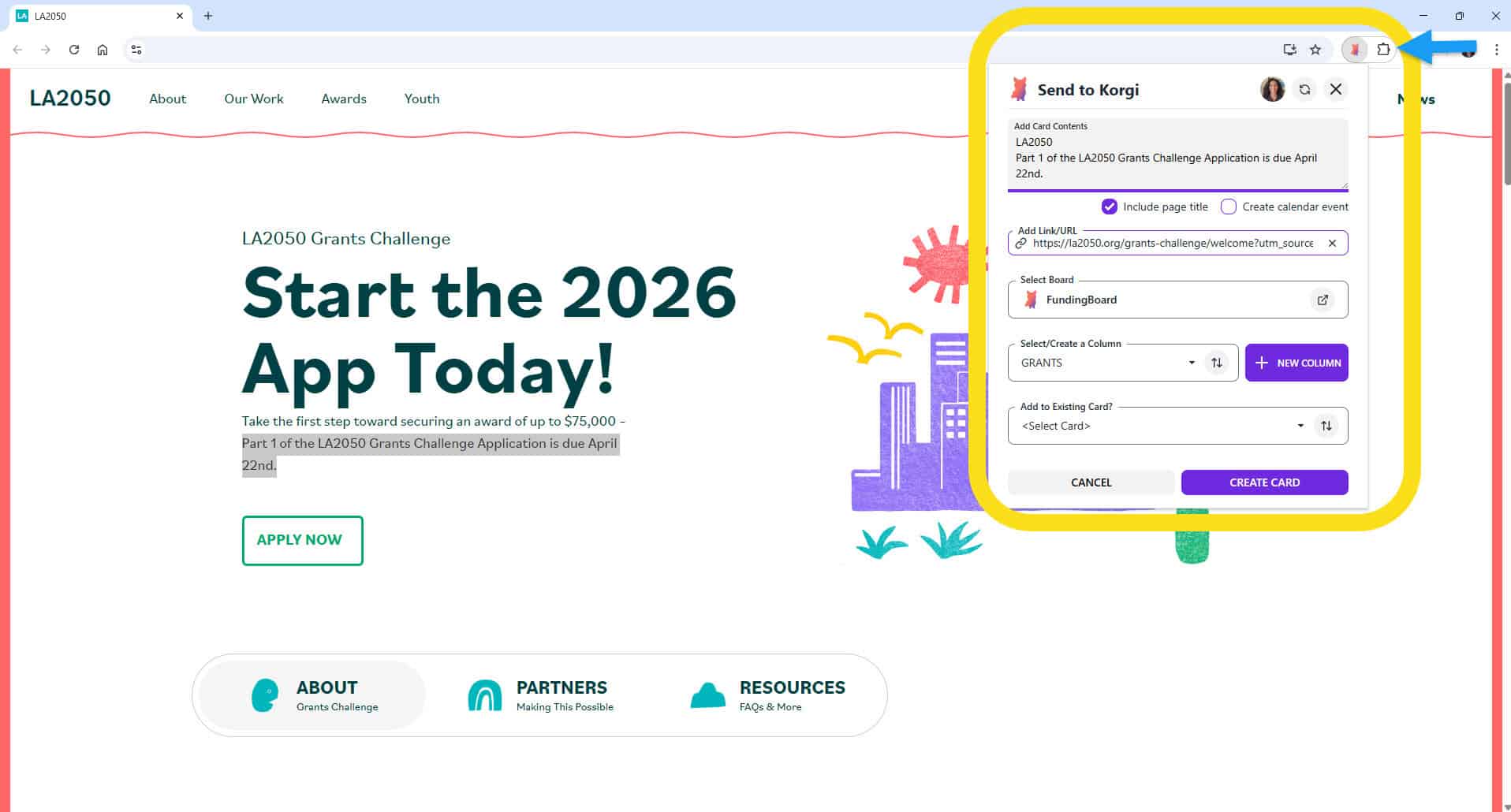
- Bookmark the filing portal. Visit your city's business license portal, and use Korgi Clipper to send the link back to the card for easy return – and even calendar the due date at the same time.
- Create a contact. From the card drawer, select the Google or Outlook contact icon to add your city's point of contact name, title, email, and website link to your contacts.
- Add notes. Use Chat/Note to timestamp related phone calls, capture renewal fees, or add other key details. If you have multiple accounts for emails and files, add notes for which account you use for this item, as well as where the emails and files lived.
If you operate in multiple cities, you may need a license in each – consult a professional, and create a separate card for each.
The Remaining Documents
The process is the same for each of the following – create a card, attach your docs, search for related assets, calendar the deadline, bookmark the portal, add contacts, and note key conversations and details.
Here's what's specific to each:
EIN (Employer Identification Number)
Your EIN is issued by the IRS and serves as your business's federal tax ID. You receive it once and it doesn't expire, but you'll reference it constantly – for tax filings, opening bank accounts, and onboarding clients or vendors.
- What to attach: Your EIN confirmation letter (CP 575 or 147C)
- Search terms: "EIN," "Employer Identification Number," "IRS," "CP 575"
- Calendar: Date of issue
- Renewal frequency: None – this is a one-time filing
- Portal Link: IRS EIN Assistant (for verification or replacement letters)
- Contact: If applicable, that service that filed for you
- Notes: calls or other conversations
If you've lost your EIN confirmation, you can request a 147C letter from the IRS.
County Business License
Some counties require a separate business license in addition to (or instead of) a city license. This is more common in unincorporated areas.
- What to attach: Current license, registration confirmation
- Search terms: "county business license," "[your county] business license"
- Calendar: Initial and annual renewal date
- Renewal frequency: Schedule filing to recur annually
- Portal Link: Your county's Clerk or Tax Collector website
- Contact: The agency, as well as representative(s) you directly engage with
- Notes: calls or other conversations
If you operate in multiple counties, you may need a license in each – consult a professional, and create a separate card for each.
FBN (Fictitious Business Name)/DBA (Doing Business As) Filing
If you operate under a name different from your legal business name, you likely filed a DBA (also called a fictitious business name). These expire and require renewal.
- What to attach: Original DBA filing, proof of publication (if required), renewal confirmations
- Search terms: "DBA," "fictitious business name," "doing business as"
- Calendar: Initial filing and required renewal intervals
- Renewal frequency: Schedule filing to recur typically every 5 years (varies by state)
- Portal Link: Your county clerk's office or state's business filing portal
- Contact: The agency, as well as representative(s) you directly engage with
- Notes: calls or other conversations
Some states require you to publish your DBA in an approved newspaper. Attach the proof of publication and a link to your county's list of approved publications.
Franchise Tax Filing
Many states impose a franchise tax on LLCs and corporations for the privilege of operating in the state. This is separate from income tax and is often due annually.
- What to attach: Initial registration, previous payment confirmations, tax board correspondence
- Search terms: "franchise tax," "[your state] franchise tax," "annual tax"
- Calendar: Initial filing and renewal deadlines
- Renewal frequency: Schedule payment to recur annually (often tied to your fiscal year or a fixed state deadline)
- Portal Link: Your state's tax board or franchise tax board website
- Contact: The agency, as well as representative(s) you directly engage with
- Notes: calls or other conversations
Some states (like California) require this even if your business earned no income. Check your state's requirements.
Seller's Permit / Sales Tax License
If you sell taxable goods or services, your state likely requires a seller's permit or sales tax license. Some states require renewal; others issue permanent permits but require regular sales tax filings.
- What to attach: Current permit, registration confirmation
- Search terms: "seller's permit," "sales tax license," "resale certificate"
- Calendar: Initial filing and renewal deadlines
- Renewal frequency: Schedule payment to recur monthly, quarterly, or annually depending on your volume
- Portal Link: Your state's tax or revenue department website
- Notes: calls or other conversations
Home Occupation Permit
If you run your business from home, some cities require a home occupation permit in addition to a standard business license. This confirms your business activity is allowed in a residential zone.
- What to attach: Permit approval, any correspondence with your city's planning department
- Search terms: "home occupation permit," "home-based business," "zoning"
- Calendar: Initial filing and renewal deadlines
- Renewal frequency: Varies – often tied to your business license renewal
- Portal Link: Your city's planning or zoning department website
- Notes: Conditions may limit signage, client visits, or employees at your home. Note any restrictions in your card, as well as calls or other conversations
Professional License
If you work in a regulated profession – real estate, accounting, cosmetology, therapy, law, healthcare, and many others – you hold a license issued by a state board. These require renewal and often continuing education.
- What to attach: Current license, CE certificates, renewal confirmations
- Search terms: "[your profession] license," "[your state licensing board]," "license renewal"
- Calendar: Initial filing and renewal deadlines
- Renewal frequency: Schedule to recur every 1–4 years, depending on profession and state
- Portal Link: Your state licensing board's website
- Notes: Note the total hours required and any specific course requirements in your card, as well as calls or other conversations.
Track your continuing education requirements on a separate card or in a dedicated column..
LLC or Corporation Annual Report
Your state of incorporation requires an annual (or biennial) report to confirm your business information is current. Filing keeps your entity in good standing; missing it can result in penalties or administrative dissolution.
- What to attach: Your most recent filed report, articles of organization or incorporation
- Search terms: "annual report," "Secretary of State," "[your state] business filing"
- Calendar: Date of incorporation, subsequent report filings
- Renewal frequency: Schedule to recur annually or biennially, depending on your state
- Portal Link: Your state's Secretary of State business search or filing portal
- Contacts: Filing agencies and representatives and your registered agent, if applicable
- Notes: Calls or other conversations
If you incorporate in a different state than the one in which you operate, you may be required to file reports in both states. Consult a professional advisor, and create a separate card for each.
Registered Agent Fee
If you use a registered agent service (a third party who receives legal and government documents on behalf of your business), you pay an annual fee to maintain that service.
- What to attach: Service agreement, payment receipts
- Search terms: "registered agent," "[your service name]," "annual renewal"
- Calendar: Initial filing and subsequent payments
- Renewal frequency: Schedule to recur annually
- Portal Link: Your registered agent provider's account dashboard
- Notes: Calls or conversations, agent changes
What You'll Have When You're Done
Once each card is set up, you can easily connect renewal notices, the latest filing, notes, questions, and subtasks to the card every year. And your reminders are set automatically. No more digging, no more reconstructing, no more wondering if you missed something. And everything you create or upload is stored to your own trusted drives.
Next Steps
- Watch the video. See how quick it is to create a "single source of truth card" for your business license.
- Use the template. Korgi’s prebuilt Business Organizer template lets you instantly review, connect, and maintain critical assets – from business filings to insurance to vendor contracts and more – in a central board, using your own Google and Microsoft accounts and drives. Start your 14-day free trial now, no credit card required!
- Book a strategy session. If you need one-on-one help with this or other year-end business organizing, book one of Korgi's "Close It Out/Kick It Off" year-end strategy sessions while spots last!
This post is for productivity purposes only and does not constitute legal or accounting advice. Consult professional advisors for guidance on your specific filing requirements.